Conductor updates
Does anyone else feel like they can't toss a rock these days without hitting a tech product unnecessarily shoe-horning "AI" into their product? It's all becoming a bit overwhelming.
On a completely unrelated note…
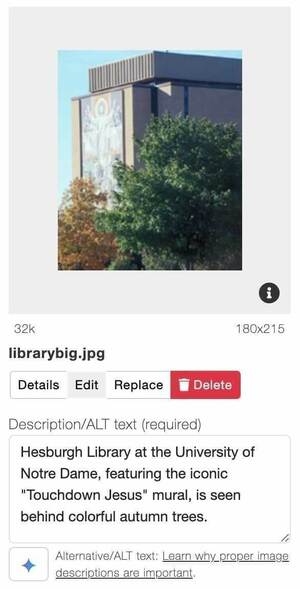
We’re excited to announce two new generative AI-powered features in Conductor that will enhance accessibility and search engine optimization! Content editors can use these features to assist in the creation of meta descriptions and image alt text. The meta description feature analyzes the text in the Content tab to produce concise, SEO-friendly summaries, helping improve search visibility. The alt text generator ensures that images are accessible to all users by providing descriptive, context-appropriate alt text, fostering a more inclusive experience for everyone.
To use these features, look for the button with the blue star  . Clicking this button will generate the content which you will then need to review and save. For meta descriptions, the button is located to the right of the input field when editing Pages. For alt text, you will find the button below the Description field when editing an image.
When using these features, be aware that these tools are meant to assist with content creation. As with any content on Notre Dame sites, the web editor is responsible for and is expected to review the generated content for accuracy, appropriateness, and best practices.
Did you know?
The Center for Social Concerns recently renamed to the Institute for Social Concerns. There are many references to the previous name throughout the University website network. Today OPAC will implement a find and replace for all instances of “Center for Social Concerns” in Conductor page content. We will not update news or events. Campus web admins should review their websites and update any related images, logos, or other references to the previous name. Let us know if you have any questions.
Recent Launches
- Notre Dame Energy
- Parseghian Fund
- Processes in Personality and Psychopathology (PoPPy) Lab
- The Bishop's Ministry of Governance Seminar
Community Articles
How to fix the 5 most common Accessibility errors
We recently reanalyzed a sample of up to 100 pages from every college and university in the United States with our Higher Ed in 4k project. Similarly WebAIM analyzed the top million most popular home pages with their WebAIM Million project. Between the projects we have learned lots of interesting information about the state of web accessibility.
Read more about How to fix the 5 most common Accessibility errors
Social Media and Accessibility - Part 2: Images & Video
Part two of a two-part blog series explores practical tips for creating accessible social media content. Topics include fonts, color contrast, hashtags, images, memes, videos, and more. The goal is to provide a checklist to help you create the most accessible social media content.
Read more about Social Media and Accessibility - Part 2: Images & Video